● Free & open source · macOS 26+ · Apple Silicon and Intel

Your Mac server, always on, for Claude Code.

One command turns a fresh Mac into a headless dev server. Every project gets its own Remote Control service, every Claude account is tracked in one place, and a little Mac app shows you what your agents are doing — from anywhere.

Set it up in 10 minutes ↓See the appNo account. No telemetry. No price tag.
$ ./bootstrap.sh
  ✔ machine ready
$ devhost account add --name business
  ✔ business logged in
$ devhost env create --account business --name acme-api
  ✔ Remote Control service running on :4100
$ devhost doctor
  ✅ 24 checks passed
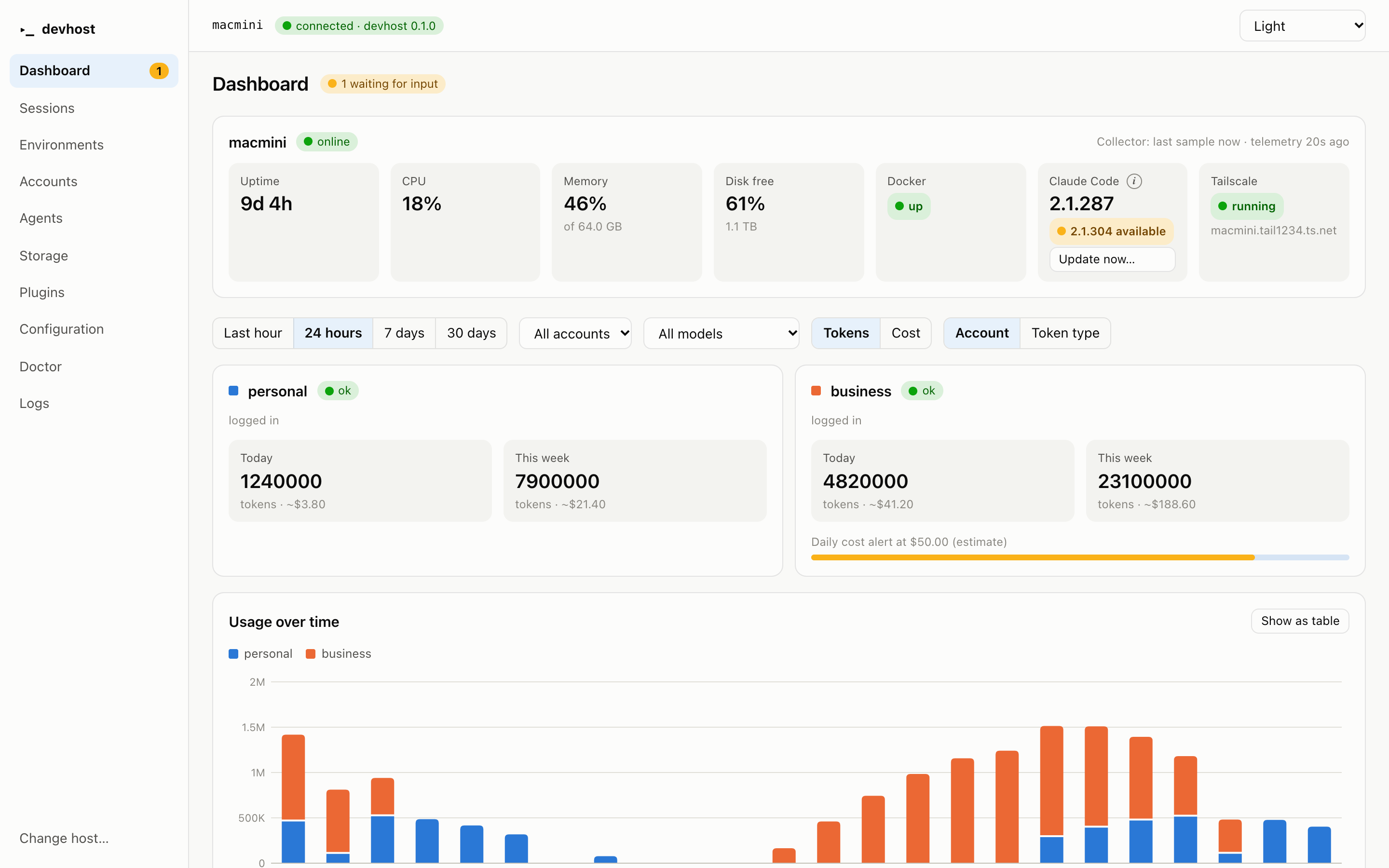
devhost Desktop dashboard with sample data
1 session waiting
acme-api · needs your answer
your-mac online
CPU 18% · up 9d
How it works

From a spare Mac to a coding farm.

You never sit at your Mac server. You set it up once, then work from your phone, your MacBook or any browser.

📦

Bootstrap

Run ./bootstrap.sh on the server. Homebrew, Node, Docker, Tailscale — all installed, idempotently.

🔑

Add accounts

devhost account add — personal, business, as many as you have. Each keeps its own login.

🗂️

Add projects

devhost env create — a repo, a port block, a Remote Control service. Back after every reboot.

📱

Work anywhere

Open the Claude app or claude.ai/code. Your sessions are already there. Watch it all in devhost Desktop.

💻 📱
YouMacBook · phone · browser
Your Mac serveralways on · headless
personal / blog :3000
business / acme-api :4100
collector usage · health
Claude
ClaudeRemote Control · claude.ai/code
Tailscale + sshRemote Controldirenv per accountgit identity per account
Features

Everything a headless dev box needs.

Boring infrastructure that stays out of your way, and a dashboard that tells you the truth about what it costs.

⚡

One idempotent command

Run apply as often as you like. A second run changes nothing, and --dry-run prints every step, sudo included.

👥

Many accounts, no mix-ups

Each Claude account gets its own config, git identity and port range. A sign-in as the wrong person is refused.

🔁

Survives reboots

Every project runs as a launchd service with Remote Control. Power cut? It comes back by itself.

💸

Cost you can see

Tokens and estimated cost by account, model and token type — with daily and hourly alerts per environment.

🙋

Know who's waiting

The menu bar and Monitor screen light up when a session needs your answer. A QR code opens it on your phone.

🧠

Context watch

Sessions past 300K context get flagged; a handoff note carries the work into a fresh one before the cache expires.

🩺

Doctor

Read-only checks with a one-line fix for each. Green means green.

🧩

Plugins

Write a small ES module for your own actions, checks and dashboard cards. Disk cleanup is built in as an example.

🔒

Careful by design

No server component, no credentials stored, no telemetry. The app only speaks your own ssh, over Tailscale.

devhost Desktop

A calm window onto a busy machine.

A native Mac app for your MacBook. Every screenshot here is the built-in demo host — invented projects, invented numbers.

One view of every account

Health of the server, usage and cost per account, sessions waiting for input, environments and a doctor that says what to fix.

devhost Desktop dashboard (demo data)

Tip: put the Monitor on a second display and keep every session in sight.

Price
Free.

Not a trial, not “free for now”. The CLI and the app are open source and you run them on your own hardware.

  • No subscription
  • No account with us
  • No telemetry
  • Your keys stay yours
Install it →
Install

Two commands and a coffee.

1 · On the Mac server

# from a clone of the repo
./bootstrap.sh

# add an account and a project
devhost account add --name personal --default
devhost env create --account personal \
  --name blog --repo git@github.com:me/blog.git
devhost doctor

2 · On your MacBook

# needs Node 24 and Rust
npm ci
npm run tauri:build:arm -w @devhost/app

# or try the UI in a browser, no ssh
npm run dev -w @devhost/app
Honest status: the app and CLI are tested against a simulated Mac, but have not yet been run on real hardware. Builds are local and unsigned. Expect rough edges and please report them.